Cached Global Library Items
A fundamental principle of data integrity in any computer system is to keep all related data together. That way, if an item changes or is deleted, all references to that item are right there in the same place. When you split data between two files, it becomes impossible to reliably maintain data integrity.
So is the solution then to keep all data together in one file? Well, not exactly. In the case of Aspect, that would mean that every customer you have and all of their sites and inspections would have to be kept in one gigantic file. Maybe that's actually feasible for a one-man operation when the data never needs to be moved around, but what about the case where you have two inspectors using two computers? If you take two copies of this gigantic file into the field and inspector #1 makes changed to one customer and inspector #2 makes changes to a different customer, and each of them add five new manufacturer library items, two of which are the same, how do you ultimately get all of this data to coordinate? When you get back to the head office, you'd need to have some way of synchronizing all of the data from the two inspectors to get the two data files to have the same data.
Normally, a client/server database keeps this integrity by only having ONE copy of the database and each person that needs to use it connects to it over a local network, or over the internet, via satellite, or whatever. In the case of Aspect though, it's simply not possible to ensure a reliable connection to the database when some of your inspection locations are deep in a concrete-bound electrical room or at a refinery in the middle of nowhere. Therefore, Aspect takes a hybrid approach to making all this work by having separate customer databases so several technicians can go into the field at the same time with different customer databases and not have the need to synchronize the data when they return to the head office. But what about the case when an inspector adds five new library items (for example, manufacturers) while in the field and uses those manufacturers in the customer database? Not a problem so far, but if that customer database gets copied to a different computer with a different global database then those new manufacturers won't be in the different global database. This is how Aspect handles a case like that:
Whenever a global library item is referenced in a customer database, it creates a local "cached" copy of that global library item that lives in the customer database along with a link to the original item in the global database. Every library item in the global database has an identifier that is guaranteed to be unique across any and all global databases that could possibly exist. So when that customer database is opened and a global library item is referenced, the following steps take place:
- For each cached global library item in the customer database, Aspect checks to see if its globally unique identifier exists in the global database. If it does, then a link directly to that library item will be established and any edits or deleted to that library item will be reflected in the customer database.
- If the cached global library item's unique identifier does not exist in this global database, then all of the cached data (such as its name and description) will be pulled from the values stored in the customer database.
|
|
If a reference to a global library item is not found in the global database and the cached valued are in use, any references to that global library item will appear with a yellow background: |

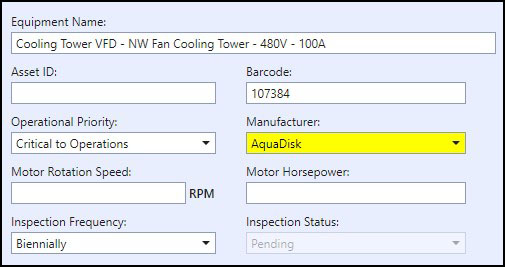
So in this case, this customer database was moved to a different computer where the manufacturer AquaDisk wasn't found in the global database so cached values were used. If this customer database was moved back to the computer where AquaDisk exists, then the reference would not have a yellow background and any changes or deleted to that global library manufacturer would be reflected in the customer database.