Problem Severity Configuration
Aspect allows you to create custom electrical problem severity ranges. Each range can have its own temperature thresholds for each severity (critical, serious, important, etc.). In addition you can redefine the names of the severity ranges, so instead of "Critical" you could call it "Severe". Note that these names are common to all severity ranges, predefined and custom--you cannot create different severity names for each range.
|
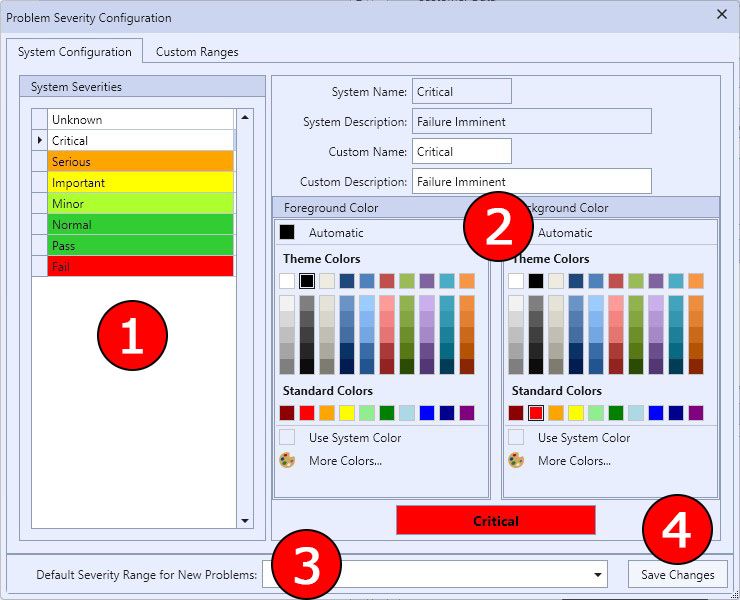
The Problem Severity Dialog - System Configuration |
1 This list contains all of the severity levels used by Aspect. Select one of these items to be able to configure the name, description, and colors used for the selected severity level.
2 This is the detail section for configuring the system problem severity levels. You can configure the name of the severity level, the description (used in the Problem Severity Descriptions report), and the foreground/background colors of the severity level. Both Foreground and Background colors have a "Use System Color" option that resets the color used to the default defined by Aspect.
3 Choose any of the predefined or custom severity ranges to be the default when a new electrical problem is created.
4 This button allows you to save any changes to the database while using the Problem Severity Configuration dialog.
|
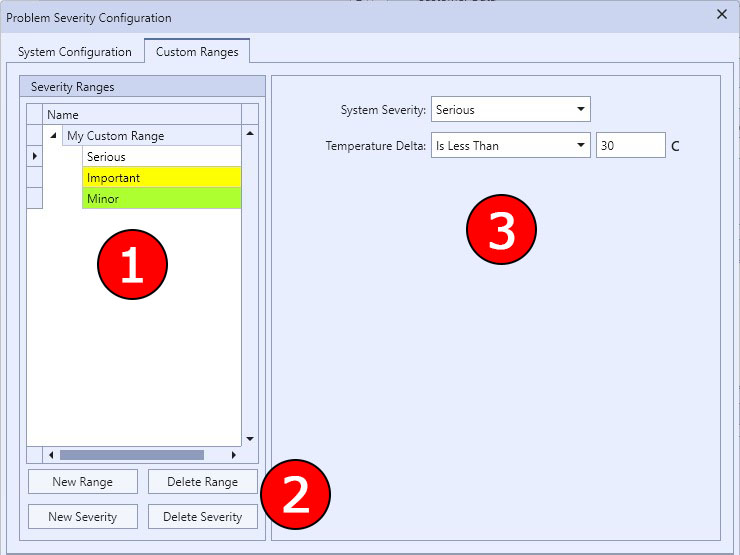
The Problem Severity Dialog - Custom Ranges |
1 This tree view contains all of custom ranges and their severity levels created by you. Select one of these items to be able to configure range and severity details.
2 These buttons allow you to create and delete custom ranges and their severity levels.
|
|
Deleting custom ranges or their severity levels will permanently delete these items--they are not sent to the Recycle Bin. |

3 This detail area allows you to set the parameters of the custom range or the range's severity levels.
Any problems that use a custom range do not maintain an association to that range by its name. Therefore, you may change the name of a custom range at any time and Aspect will still be able to maintain the tie to that custom range. However, if you delete a custom range and re-create one with the same name, any problems in any customer database that were using the deleted custom range will lose the relationship with the deleted custom range and show up as "Unknown" in the problem detail.
Custom ranges can be used with reference components under similar load or ambient air. The default is reference components.
When creating a custom severity level, you must define two things: the corresponding system severity and the maximum temperature delta for this severity. For a custom severity, you can choose from four system severity levels: normal, minor, important, and serious (again, these system severity names can be renamed by you in the System Configuration tab). Custom severity levels correspond to a system severity level so that all severity levels in any range, predefined or custom, use one consolidated set of names, descriptions, and colors.
How severity calculations are done:
All severity calculations in Aspect are performed in the following manner, whether the calculation is being performed using one of the predefined severity ranges or a custom one. It is imperative that you understand how these calculations are made when defining your own custom ranges.
First of all, note in the custom severity detail that the Temperature Delta value is one number that represents the maximum temperature difference between the problem component and either reference components or ambient air--the value of a severity is not a range between two temperatures. Therefore, to calculate a severity, Aspect sorts all of the severity levels for a range starting with the one with the lowest delta and ending with the highest delta. Then, the actual problem temperature delta is compared against each severity level to see if it is less than (or equal to if you choose) the severity's maximum temperature delta. If it is, the calculation is stopped and that severity level is used. If all of the severity levels have a maximum temperature delta that is less than the problem delta, then the highest system severity level is chosen--Critical. Therefore, the Critical severity range doesn't have a maximum temperature delta, but rather it's a catch-all when all other severity levels do not qualify. That is why the Critical system severity level is not available for custom severity ranges--it's automatically there and will be used when the temperature delta is greater than all of the other severity level thresholds.
To illustrate, let's suppose we have a problem component with a temperature of 123°C and the reference component is 100°C for a temperature delta of 23°C. We have defined our severity levels in our custom range like this:
|
System Severity |
Temperature Delta - C |
|
Serious |
25 |
|
Important |
15 |
|
Minor |
5 |
When calculating, Aspect starts with the smallest delta, in this case Minor. Since our problem's temperature delta (23°) is more than 5°, Aspect tries the next level, Important. Important's temperature delta (15°) is still less than 23°, so Aspect tries the next level, Serious. Since the problem's temperature delta of 23° is less than the temperature delta of the Serious severity level (25°), Serious is chosen as the calculated severity level.
In our example, if the problem's temperature delta had been greater than 25°C, Aspect would use the catch-all severity level Critical as the calculated severity.
|
|
It is highly recommended (but not required) to define a severity of Normal in all of your custom ranges. The temperature delta for Normal is most often 0-2°, but without the Normal severity level being defined, the severity calculation will return one of the other severity levels (Minor, Important, Serious...) when the problem temperature may be less than or equal to the reference temperature, which usually indicates a perfectly normal condition. Another way to say this is that your custom range would always return a problem condition of some degree no matter what the temperature delta is--even if the problem component's temperature is less than the reference one. |