Inspection Groups
|
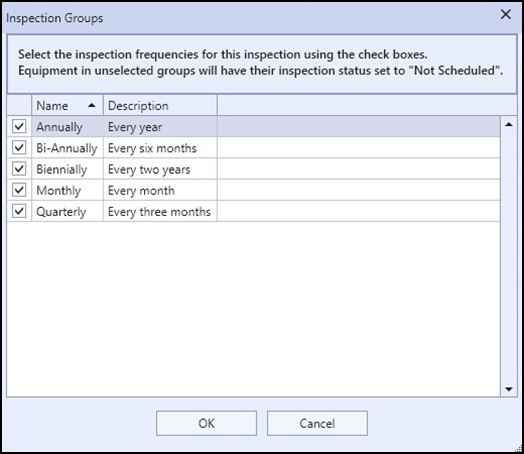
The Inspection Groups Configuration Dialog |
Inspection groups allow you to configure an inspection to only include groups of locations and equipment for inspection based on their inspection frequencies. When selecting inspection groups in an inspection, any locations and equipment whose inspection frequency is included in the inspection groups will start with their inspection status as Pending, and any locations and equipment not in the selected inspection groups will have their statuses set to Not Inspected, Not Scheduled. Inspection frequencies are members of the Global Library, which means you can create and delete new frequencies as much as you want.
Let's take this example: you have a very large building consisting of 80 floors that the building engineer wants you to inspect the top half on even numbered years and the bottom half on odd numbered years, simply because the building is too large and costs too much to inspect every year. Using the Library Editor, you can create two new inspection frequencies called "Odd Numbered Years" and "Even Numbered Years". Then, you simply have to set the locations and equipment in the building for everything greater than floor 40 to "Even Numbered Years" and everything from floors 1 to 40 to "Odd Numbered Years". When you create a new inspection for the building, you choose "Set Inspection Groups..." and only check either the even or odd inspection frequency depending on what year it is. Once you click OK, the inspection statuses of all of the locations and equipment in the site will be set appropriately.
|
|
Locations have the ability to set the inspection frequency of all of their contained equipment (and optionally sub-locations) to a desired inspection frequency. You do not have to set each piece of equipment individually. You can do this with the Set Sub-Item Inspection Frequency button in a location's detail. |

|
|
It is not necessary to set the inspection groups of a new inspection to include everything. All locations and equipment will be included by default. You only need to set inspection groups for a new inspection when you need to limit the locations/equipment that will be inspected. |
You can change the inspection groups of an inspection after the inspection has been started. When adding an inspection group, only those locations and equipment that are marked as Not Inspected, Not Scheduled will be set to Pending after clicking OK, and when removing an inspection group, only those locations and equipment that are marked as Pending will be set to Not Inspected, Not Scheduled. Any equipment and locations that have been marked with any other status code will be unchanged. The determining factor for setting the inspection status of a location automatically is based on the inspection statuses of everything in that location. If all of the sub-items (locations and equipment within that location) are set to Pending, then the location's status will be set to Pending. Likewise, if everything in that location is set to Not Inspected, Not Scheduled, then the location's status will also be set to Not Inspected, Not Scheduled.