Documenting a Problem
Documenting an electrical or visual problem in Aspect starts with either a location or an equipment component. Therefore, you do not create a new problem from the Problems tab. Here are the steps for creating a new problem:
- While the location or equipment component is selected, do one of the following:
- Click New Problem from the Home page of the ribbon bar.
- In the problem documentation section of the location or equipment detail, click New Problem.
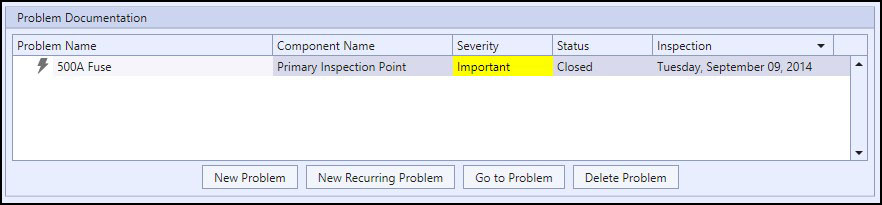
|
The Equipment Problem Documentation Section |
- Once the New Problem window appears, choose either visual or electrical problem, give the problem a name (a brief description of the problem) if you want, and click OK or OK and Goto Detail. If you don't enter a name, the problem's ID will be used in its place. If you click OK and Goto Detail, the problem will be created and you will be taken to the problem detail page to begin filling out the problem data.
|
|
Locations can only have visual problems (the roof in an electrical closet is leaking for example). |

Choosing a Severity Calculation Method
Aspect can calculate an electrical problem's severity using two methods: reference component and absolute temperature criteria. When choosing reference component, you can also choose a severity calculation range which can be one of the predefined ranges defined by Aspect or a custom range defined by you. Because these parameters are associated with a problem, you can have different severity calculation methods for every problem in the inspection. For more information, see the topic on Severity Calculation Method.
Filling in the Text Fields
A problem has four narrative text fields associated with it: description, cause, consequences, and repair procedure. Aspect helps simplify the process of entering these fields through the use of templates. Templates are part of your global library, and if set up properly, they can make the process of documenting a problem much more efficient. For more information, see the topic on Problem Templates.
Recurring problems
Recurring problems are created from existing problems that are still open from a previous inspection. For example, suppose you're inspecting a transformer that had a problem that was identified during the previous inspection the year before and the client has still not fixed the problem. Creating a recurring problem will flag it in the problem reports as being derived from the pre-existing open problem from the previous inspection. This has the benefit of essentially "linking" the problems together, and in the problem reports the client is also able to click on navigation links to move back and forth between these problems. Perhaps the initial problem had a severity of Important, but the recurring problem is now Serious because the failing component is getting worse. You could certainly just create a new problem and document it without relating it to a pre-existing problem, but recurring problems are able to show the progressing history of a specific problem much more readily than isolated problems. Here are the steps for creating a recurring problem:
- In the problem documentation section of a location or equipment component, select the problem that will be the "parent" problem of the new recurring problem. Note that recurring problems must be created from the problem documentation section of a location or equipment component--the ribbon bar cannot be used to create a recurring problem, and the parent problem must be an open problem.
- Choose New Recurring Problem. A new problem will be created in the problem list as a child of the parent problem. In the problem detail, all common information from the parent problem will be used to create the recurring problem, such as the environment, risks to production and safety, and the four text fields (description, cause, consequences, and repair procedure). Note that for an electrical problem, none of the temperature data will be copied from the parent problem. In addition, all images associated with a recurring problem will be taken from the current inspection, not the one for the parent problem.